Showing posts with label iphone Apps. Show all posts
Sunday, 21 August 2011
How to print emails, webpages, and photos as PDFs?
Print to PDF [$3.99 - App Store link] is exactly what you are looking for! It’s a universal application for the iPhone and iPad that adds “Print to PDF” as a printer when using Apple’s built in printing feature. This includes, emails, email attachments, websites, and photos. All you need to do is have Print to PDF running in the background.
Another really cool feature about Print to PDF, is that if you have multiple devices running Print to PDF and they’re all connected to the same WiFi network, you can print to any of those devices.
Friday, 19 August 2011
Zander - Virtual Pet Alien IPhone Application
Play with Zander all day long. Zander requires no clean up and does not stain the carpets. Since your pet alien is from another planet, the vet bills can be kept to a minimum.
Learn Zander's alien language and you can speak to him and have him do what you want. But, be careful…Zander is not fond of bad words. Don't ignore him for too long, he'll get a little upset.
Zander can do many things and understands over 70 commands. Try to figure out everything that he can do!
Play music with Zander and don't forget to send a photo of yourself with Zander to all your friends!
The first in the series, Zander is the leading character of Zalotvia. Keep your eyes out for the rest of the Zalotvians coming soon!
Download from iTunes
CarbonX HD Pro-Theme For IPhone
Elegant and stylish Carbon inspired theme with black and blue icons for use with WinterBoard and optimized for Phone 4 Retina-display.
The most complete theme for your iPhone 4 and it comes with a lot of options for you to customize…
Download
Features:
5 different Badge Styles
4 different Page Dot Styles
4 different Icon Label Styles
4 different Loading/Install bar Styles
4 different Folder Styles
4 different Background Styles
3 different Battery Styles
2 different complete SMS UI
2 different Unlock Sliders
The most complete theme for your iPhone 4 and it comes with a lot of options for you to customize…
Download
Features:
5 different Badge Styles
4 different Page Dot Styles
4 different Icon Label Styles
4 different Loading/Install bar Styles
4 different Folder Styles
4 different Background Styles
3 different Battery Styles
2 different complete SMS UI
2 different Unlock Sliders
Thursday, 18 August 2011
An iPhone controlled helicopter
Add Griffin Technology on your wish list of iPhone-controlled helicopter makers (and Parrot’s AR.Drone and Keyword Shopping’s iHelicopter, if you haven’t yet). The Helo TC, announced today, works with a free iOS app that lets you control a twin-rotor helicopter by the means of touching virtual buttons or tilting your device. Interestingly, the app talks to the helicopter using an infrared battery-powered module attachable to your iOS device’s headphone jack rather than communicate via a wireless base station in your home or office.
You can even store your best maneuvers as presets and invoke them later to amaze your boss. We can tell why these things are popular in offices, if the below over the top commercial is an indication. Three people can play at once, each on a different channel. The Helo TC costs fifty bucks and is available now from the company’s online store and the iOS app is a free download from the App Store.
Free iPhone apps that help you manage your fuel costs
Information is key to keeping costs down. If you can manage all the relevant data, then you can get an accurate picture of how much you are spending and then manage your budget accordingly. This is where mobile phones in general have caused a bit of a revolution. They make the exchange of information nearly instantaneous, which helps people save money. Smart phones have certainly enhanced this whole effect and there is now a host of apps to help you monitor and reduce costs in virtually every part of your life. The following are some innovative apps for the iPhone that are designed to help you reduce fuel costs.
AAA TripTik Mobile: This app helps you find the lowest prices in the local area or while travelling. It shows information for all grades of fuel. Moreover, it also provides directions to other interesting places like hotels, restaurants or local sights. The best part is that it even allows you to call these places for reservations. Similar apps include Gas Buddy and Local Gas Prices.
CarEconomy: This app calculates your car’s average fuel economy. If you upgrade the app, it will show you fuel economy information in real-time.
Gas Cubby: This app calculates the gas mileage and vehicle maintenance cost. It then displays information like MPG, gas prices and fuel/maintenance costs in a chart format. You can also use the app to provide you with helpful reminders.
Gas Manager: This app automatically tracks fuel economy, fuel cost and distanced travelled. It can even crunch through this data to provide a picture of your carbon footprint. It can also locate gas stations, hotels and service centers within the local area.
Road Trip Lite: This is great for all those users who have multiple vehicles. Like the others, this app can calculate a car’s fuel economy, maintenance and fuel costs. It also allows users to import and export data to Microsoft Office.
AAA TripTik Mobile: This app helps you find the lowest prices in the local area or while travelling. It shows information for all grades of fuel. Moreover, it also provides directions to other interesting places like hotels, restaurants or local sights. The best part is that it even allows you to call these places for reservations. Similar apps include Gas Buddy and Local Gas Prices.
CarEconomy: This app calculates your car’s average fuel economy. If you upgrade the app, it will show you fuel economy information in real-time.
Gas Cubby: This app calculates the gas mileage and vehicle maintenance cost. It then displays information like MPG, gas prices and fuel/maintenance costs in a chart format. You can also use the app to provide you with helpful reminders.
Gas Manager: This app automatically tracks fuel economy, fuel cost and distanced travelled. It can even crunch through this data to provide a picture of your carbon footprint. It can also locate gas stations, hotels and service centers within the local area.
Road Trip Lite: This is great for all those users who have multiple vehicles. Like the others, this app can calculate a car’s fuel economy, maintenance and fuel costs. It also allows users to import and export data to Microsoft Office.
Skype WiFi For iPhone Released
Skype has just released a new service, and with it an iOS app to go with it. Skype WiFi allows you to connect with 1 million different Wi-Fi hotspots around the world, and if paying is a problem, you're allowed to use your Skype credit.
Going through the features in detail:
• Use Skype WiFi to connect to WiFi hotspots at hotels, airports, train stations, bars and restaurants – available at over 1 million hotspots worldwide.
• Just one tap to connect – then browse the internet, check email, use Skype, check Facebook, update Twitter, upload photos, download music or ebooks.
• Only pay for the time you’re connected - there are no limits on the amount of data you can upload or download.
And:
• With Skype WiFi , you can go online and pay by the minute. Before you connect, you’ll clearly see the cost of the hotspot you’re connecting to.
• Remember, you’ll only ever be charged for the minutes you’re connected, not the amount you download or upload.
• You’re in control – each session lasts for a maximum of 30 minutes and you’ll be asked to reconnect if you wish to continue your session. You can tap Disconnect at any time.
• Check Skype WiFi availability and costs at skype.com/go/skypewifi
All you need is to have a positive balance on your Skype credit to use this feature. The iOS App is free and you can get it in the App Store.
Via: TiPB
Source: iTunes
iOS App Picks 17 Aug 2011
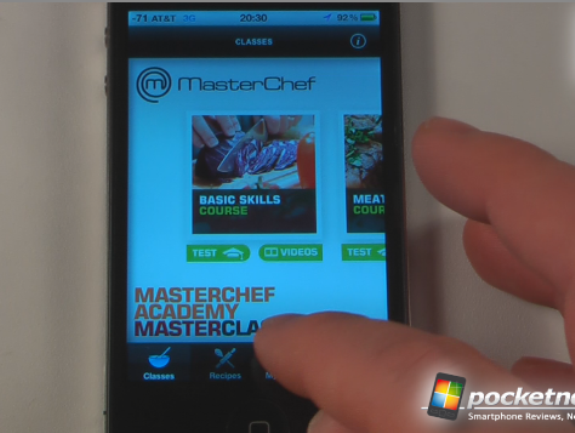
In this episode of the iOS App Picks we demonstrate five applications in 30 seconds each. These apps will keep you entertained, allows you to find great deals on travel, and compute virtually any problem. To download these apps directly to your iPhone, just click on the title of the application and the iTunes software will automatically launch to the app in the App Store. If you have the free Google Search app installed on your iPhone just snap a picture of the QR-Code using Google Goggles or any other QR-Code scanner that will launch the App Store on your iPhone.
Masterchef Academy – $2.99 full version, no lite version available
Sunday, 14 August 2011
Alien Space Retro – Todays free app
The best space shooter in the App Store is now Retro! Inspired by classic games like Asteroids, Alien Space Retro combines the best of old and new, bringing dual-stick shooter gameplay to a new level. Your mission: Pilot your ship into the heart of enemy space and destroy anything that gets in your way.
Name: Alien Space Retro| Download from: iTunes | Price: Free
TableDrum – iPhone Drum Application
Ever dreamt of becoming a drummer without having to purchase, carry and assemble a complete drum set? The solution is simple; gear up with some office supplies, a pair of headphones, your favourite Apple iOS device and unleash the power of your pocket-sized drum set. You can now build your own virtual drum set from practically anything. Music applications where users tap the screen are things of the past
Source
8 Bit Rally – Free app of the day
Revisit the good old days of arcade racers with 8 Bit Rally, the latest game developed by Photon Creations. Race on tracks all around the world, through some of the harshest and picturesque environments against 19 other competitors all aiming for the prized 8 Bit Cup. Earn prize money from races, purchase car upgrades & new car models, gaining that edge over the competition.
Name: 8 Bit Rally| Download from: iTunes | Price: Free
source
iPhone / iPad app: Mad Wheels – Review
Do you know what makes a racing game highly unrealistic, yet a lot more fun? Why, being able to blast your opponents to smithereens, of course! That is pretty much what Mad Wheels is all about, you take your ride for a spin around the track while dodging the bullets and rockets that the other drivers are showering you with. However, should they be unfortunate enough to land in your scope, you have the absolute right to turn them into dust by unleashing your arsenal at them.
Name: Mad Wheels| Download from: iTunes | Price: 1$
Via dailyiphoneblog
Tinychat FB – Group Video chat for Facebook
Facebook video chat app by Tinychat. Video chat with up to 12 of your Facebook friends at once.
Name: Tinychat FB| Download from: iTunes | Price: Free
Facebook v 3.4.4 for iPhone , iPod Touch and iPad
Facebook has released version 3.4.4 of its official client for the iPhone of Apple .
Among the innovations of this update include the restoration of the Send button for comments, chat and messaging, friends lists, and News in the filter section have been resolved a number of bugs that caused the interruption of ‘ application .
Facebook for iPhone and iPod Touch is also compatible with iPad and is downloadable for free on the Apple Store .
Sunday, 3 July 2011
Dr Weed - Medical Marijuana News & Strain Guide v1.0
Requirements: iPhone, iPod touch, and iPad. Requires iOS 3.1.3 or later
Overview: The information contained in this app is for educational purposes only and is
meant for people who live in areas where growing marijuana is legal or
tolerated for medical or other reasons. Do not use this information to break
GROWER'S GUIDE (UNLOCK):
NOTE: TO UNLOCK THE GROWER'S GUIDE. PLEASE TAP ON THE
CIRCULAR ARROWS AT THE TOP LEFT OF THE APP TO SYNC AND
DOWNLOAD THE NEWEST INFO, THE GROW GUIDE WILL THEN
APPEAR AT THE TOP JUST AS OUR SCREENSHOTS SHOW.
More Info:
http://ax.itunes.apple.com/app/id410012061?mt=8
Requirements: iPhone, iPod touch, and iPad. Requires iOS 3.1.3 or later
Overview: The information contained in this app is for educational purposes only and is
meant for people who live in areas where growing marijuana is legal or
tolerated for medical or other reasons. Do not use this information to break
GROWER'S GUIDE (UNLOCK):
NOTE: TO UNLOCK THE GROWER'S GUIDE. PLEASE TAP ON THE
CIRCULAR ARROWS AT THE TOP LEFT OF THE APP TO SYNC AND
DOWNLOAD THE NEWEST INFO, THE GROW GUIDE WILL THEN
APPEAR AT THE TOP JUST AS OUR SCREENSHOTS SHOW.
More Info:
http://ax.itunes.apple.com/app/id410012061?mt=8
File Arsenal v2.0.2
File Arsenal v2.0.2
Requirements: Compatible with iPhone, iPod touch, and iPad. Requires iOS 3.0 or later
Overview: Get all the latest, breaking Arsenal news and live match updates at your fingertips with the Official Arsenal App for iPhone, iPad and iPod Touch. The Official Arsenal App has all the information any fan could want - the latest news, tables, fixtures and player biographies. And you can now follow every first-team game live on the app.
Get live text commentary, the latest team news and match previews and reports in our Match section. Watch highlights*, see Arsène Wenger deliver the latest injury news in our video section and view match photos after every game.
FEATURES:
- Latest news, table and fixtures
- LIVE text commentary, team lists and other scores
- Push half-time and full-time score notifications
- Match highlights* and injury news videos
- Picture galleries from every game
- Squad info
PLUS BUY A MATCH PACKAGE OR LOGIN AS AN EXISTING ARSENAL TV ONLINE SUBSCRIBER FOR:
- LIVE audio commentary as part of our Matchday show
- Matchday show also includes pre-match built-up and post-match reaction, interviews and phone-in
- Extended highlights
- Exclusive video interviews with the boss and players
* UEFA Champions League games are not included in the free highlights with this app.
Please note:
Live audio commentary and premium videos require you to buy a match package or login to Arsenal TV Online. This is only supported for devices running iOS 3.2 or later.
Arsenal for all iPod, iPhone and iPads. This is the current version 2.0.2.
More Info:
http://itunes.apple.com/us/app/arsenal/id332060637?mt=8
Requirements: Compatible with iPhone, iPod touch, and iPad. Requires iOS 3.0 or later
Overview: Get all the latest, breaking Arsenal news and live match updates at your fingertips with the Official Arsenal App for iPhone, iPad and iPod Touch. The Official Arsenal App has all the information any fan could want - the latest news, tables, fixtures and player biographies. And you can now follow every first-team game live on the app.
Get live text commentary, the latest team news and match previews and reports in our Match section. Watch highlights*, see Arsène Wenger deliver the latest injury news in our video section and view match photos after every game.
FEATURES:
- Latest news, table and fixtures
- LIVE text commentary, team lists and other scores
- Push half-time and full-time score notifications
- Match highlights* and injury news videos
- Picture galleries from every game
- Squad info
PLUS BUY A MATCH PACKAGE OR LOGIN AS AN EXISTING ARSENAL TV ONLINE SUBSCRIBER FOR:
- LIVE audio commentary as part of our Matchday show
- Matchday show also includes pre-match built-up and post-match reaction, interviews and phone-in
- Extended highlights
- Exclusive video interviews with the boss and players
* UEFA Champions League games are not included in the free highlights with this app.
Please note:
Live audio commentary and premium videos require you to buy a match package or login to Arsenal TV Online. This is only supported for devices running iOS 3.2 or later.
Arsenal for all iPod, iPhone and iPads. This is the current version 2.0.2.
More Info:
http://itunes.apple.com/us/app/arsenal/id332060637?mt=8
JotNot Scanner Pro v3.1
Requirements: Compatible with iPhone, iPod touch, and iPad. Requires iOS 3.1.2 or later
Overview: JotNot is the original and premier multi-page document scanner for the iPhone.
"I’ve found that if you take the picture carefully, JotNot can capture a document as well as a fax machine can. And, of course, it’s much easier to carry around."
➜ The New York Times
"I am amazed at how readable the processed images are."
➜ MacWorld UK / The Industry Standard
"The application works perfectly for casually taking photographs of your documents to ensure that you don’t lose them, and is one that I’ll probably wind up using pretty frequently."
➜ TechCrunch
✚ JotNot can save anything
Use JotNot to scan and save documents, receipts, whiteboards, business cards, notes, recipes, photographs, billboards, posters, books, art--almost anything you can take a picture of.
✚ Enterprise level document scanning
JotNot can batch scan multiple pages of a document dramatically speeding up your workflow. JotNot can add, delete, or reorder pages or even move them across documents. For sensitive information JotNot can password protect your PDFs.
✚ Faxing to US numbers
Fax to US numbers for $0.99 for up to 5 pgs. We charge per fax because we incur a cost per minute of fax transmit time just like any other long distance call. In our testing "free" Internet fax services/servers are not always reliable.
✚ Adjust file size and resolution
JotNot gives you the ability to control file size and resolution of your scans. Need smaller files? Just adjust the file size slider and the resolution slider under settings.
✚ Save and share with JotNot
JotNot has built-in support to save or share your documents by email, iDisk/WebDAV, Evernote, Dropbox, Google Docs with OCR, and Box.net.
✚ Tag, search, and sort documents
Find documents quickly by tagging documents and searching by tag or name. Sort documents by name or date. Rename or delete documents to stay organized.
✚ PDF preview
View PDF documents exactly as they appear on a computer. Export them to other iOS apps (such as iBooks) or print them through AirPrint.
✚ Standard and custom page sizes
JotNot automatically detects standard page sizes like Letter, A4, or Legal for standard documents. JotNot also supports custom page sizes for receipts.
✚ Proprietary image processing
JotNot automatically detects edges and processes images to remove shadows, correct contrast, and adjust white balance, so that scans come out looking as crisp and clear as possible every time.
All the processing happens on your iPhone so confidential data remains under your control. JotNot works forever, there's no subscription fee, and you don't need Internet access to scan documents.
See our Youtube channel for product demonstrations:
http://www.youtube.com/user/jotnotdemo
JotNot has many additional features including:
✚ A simple, easy to use interface
✚ Camera stabilization
✚ Quick capture “Single Page Mode”
✚ Automated backup of scans
✚ Ability to email PDFs, PNGs, and JPEGs
✚ Presets for receipts, documents, and more
✚ Ability to save to the Photo Library
✚ Ability to import from the Photo Library
✚ An extensive help (under Settings / Help)
Tips to get the best quality scans:
● Keep the document flat and well lit
● Use a preset mode when possible (e.g. receipt)
● For faint text try maxing out the contrast
● Try to use image stabilization if possible
● For the 3GS or iPhone 4, wait for the autofocus
We would love your suggestions. Please take our survey at http://blog.jotnot.com to help us decide on what to add next.
Please contact JotNot customer service at support@jotnot.com to try to resolve any problems before submitting feedback. Most problems can be solved easily, but we cannot help you solve your problem from the comments.
What's New in Version 3.1
- security fix
- webdav enhancements
- file rename bug fix
More Info:
http://itunes.apple.com/us/app/jotnot-scanner-pro/id307868751?mt=8
Download Instructions
Megaupload
Requirements: Compatible with iPhone, iPod touch, and iPad. Requires iOS 3.1.2 or later
Overview: JotNot is the original and premier multi-page document scanner for the iPhone.
"I’ve found that if you take the picture carefully, JotNot can capture a document as well as a fax machine can. And, of course, it’s much easier to carry around."
➜ The New York Times
"I am amazed at how readable the processed images are."
➜ MacWorld UK / The Industry Standard
"The application works perfectly for casually taking photographs of your documents to ensure that you don’t lose them, and is one that I’ll probably wind up using pretty frequently."
➜ TechCrunch
✚ JotNot can save anything
Use JotNot to scan and save documents, receipts, whiteboards, business cards, notes, recipes, photographs, billboards, posters, books, art--almost anything you can take a picture of.
✚ Enterprise level document scanning
JotNot can batch scan multiple pages of a document dramatically speeding up your workflow. JotNot can add, delete, or reorder pages or even move them across documents. For sensitive information JotNot can password protect your PDFs.
✚ Faxing to US numbers
Fax to US numbers for $0.99 for up to 5 pgs. We charge per fax because we incur a cost per minute of fax transmit time just like any other long distance call. In our testing "free" Internet fax services/servers are not always reliable.
✚ Adjust file size and resolution
JotNot gives you the ability to control file size and resolution of your scans. Need smaller files? Just adjust the file size slider and the resolution slider under settings.
✚ Save and share with JotNot
JotNot has built-in support to save or share your documents by email, iDisk/WebDAV, Evernote, Dropbox, Google Docs with OCR, and Box.net.
✚ Tag, search, and sort documents
Find documents quickly by tagging documents and searching by tag or name. Sort documents by name or date. Rename or delete documents to stay organized.
✚ PDF preview
View PDF documents exactly as they appear on a computer. Export them to other iOS apps (such as iBooks) or print them through AirPrint.
✚ Standard and custom page sizes
JotNot automatically detects standard page sizes like Letter, A4, or Legal for standard documents. JotNot also supports custom page sizes for receipts.
✚ Proprietary image processing
JotNot automatically detects edges and processes images to remove shadows, correct contrast, and adjust white balance, so that scans come out looking as crisp and clear as possible every time.
All the processing happens on your iPhone so confidential data remains under your control. JotNot works forever, there's no subscription fee, and you don't need Internet access to scan documents.
See our Youtube channel for product demonstrations:
http://www.youtube.com/user/jotnotdemo
JotNot has many additional features including:
✚ A simple, easy to use interface
✚ Camera stabilization
✚ Quick capture “Single Page Mode”
✚ Automated backup of scans
✚ Ability to email PDFs, PNGs, and JPEGs
✚ Presets for receipts, documents, and more
✚ Ability to save to the Photo Library
✚ Ability to import from the Photo Library
✚ An extensive help (under Settings / Help)
Tips to get the best quality scans:
● Keep the document flat and well lit
● Use a preset mode when possible (e.g. receipt)
● For faint text try maxing out the contrast
● Try to use image stabilization if possible
● For the 3GS or iPhone 4, wait for the autofocus
We would love your suggestions. Please take our survey at http://blog.jotnot.com to help us decide on what to add next.
Please contact JotNot customer service at support@jotnot.com to try to resolve any problems before submitting feedback. Most problems can be solved easily, but we cannot help you solve your problem from the comments.
What's New in Version 3.1
- security fix
- webdav enhancements
- file rename bug fix
More Info:
http://itunes.apple.com/us/app/jotnot-scanner-pro/id307868751?mt=8
Download Instructions
Megaupload
Tube Downloader v1.2
Requirements: Compatible with iPhone, iPod touch, and iPad. Requires iOS 4.1 or later.
Overview: Download videos from a variety of tubes and video sites to your iPhone, iPod Touch and iPad!
What's New in Version 1.2
Fixes:
* Metacafe notification message added if video is not supported
* File/Folder manager minor fixes
Improvements:
* User-agent option. Please note: iPad and Safari user-agent are not always allowing to download from different sites.
* Clear Cookies
* Some video networks added (m.youku.com, lynda.com, iphone.dailymotion.com, 4shared.com, m.funnyordie.com)
* Changes to bookmarks order
!!!Important notice to users of Tube Downloader v.1.1.!!!
Tube Downloader v.1.2. is not compatible with version 1.1. If you have version 1.1 installed on your device, and update it to version 1.2 – it will crash each time when you go to Settings tab! Bookmarks section will not be updated as well. The issues will be solved in version 1.3, which is planned to be released in about 1 week. So, if you want to keep your video collection we advise you not to install version 1.2 and wait for 1.3 release.
If deleted videos are not important (or you haven't downloaded any), then you can update Tube Downloader to version 1.2.
To update to version 1.2 you need first to remove version 1.1 from your device and then install version 1.2.
More Info:
http://itunes.apple.com/us/app/tube-downloader/id440238636?mt=8
Requirements: Compatible with iPhone, iPod touch, and iPad. Requires iOS 4.1 or later.
Overview: Download videos from a variety of tubes and video sites to your iPhone, iPod Touch and iPad!
What's New in Version 1.2
Fixes:
* Metacafe notification message added if video is not supported
* File/Folder manager minor fixes
Improvements:
* User-agent option. Please note: iPad and Safari user-agent are not always allowing to download from different sites.
* Clear Cookies
* Some video networks added (m.youku.com, lynda.com, iphone.dailymotion.com, 4shared.com, m.funnyordie.com)
* Changes to bookmarks order
!!!Important notice to users of Tube Downloader v.1.1.!!!
Tube Downloader v.1.2. is not compatible with version 1.1. If you have version 1.1 installed on your device, and update it to version 1.2 – it will crash each time when you go to Settings tab! Bookmarks section will not be updated as well. The issues will be solved in version 1.3, which is planned to be released in about 1 week. So, if you want to keep your video collection we advise you not to install version 1.2 and wait for 1.3 release.
If deleted videos are not important (or you haven't downloaded any), then you can update Tube Downloader to version 1.2.
To update to version 1.2 you need first to remove version 1.1 from your device and then install version 1.2.
More Info:
http://itunes.apple.com/us/app/tube-downloader/id440238636?mt=8
Subscribe to:
Posts (Atom)